
Search license plates with filters and rules
Find a car when you only remember part of its plate, and get told when a plate shows up.
By the end you will search your license plate results, even when you only know part of a plate. You will also make a rule that tells you when a plate you care about shows up. This is the license plate page in Silarius Cloud Admin. It is new and still being tested.
What you need
- License plate recognition is on for your cameras (see License plate recognition)
- You are an owner or admin in Silarius Cloud Admin
- Silarius support has turned on the license plate page for your account
Step by step
- Open the license plate page
Go to silariussecurity.com/login and sign in to Silarius Cloud Admin. Click the LPR tab. LPR means license plate recognition. The Events list shows every plate that was read.

- Make a filter
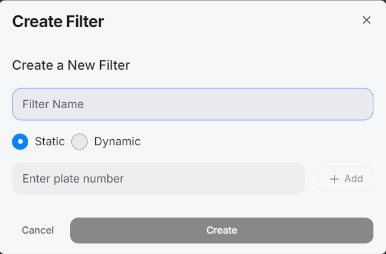
Click Filters, then Create filter. Give it a name. - Static: type exact plate numbers, like a list of known cars. - Dynamic: build a search from parts of a plate.
- Use * for the parts you don't know
The star * means "anything here". If the plate started with CFB and ended with 54, search for CFB*54. One star can stand for one letter or many.
- Combine what you know
Pick Dynamic and click Define Filter Conditions. Add a Plate Condition for each thing you remember. Join them with And, Or, Except or Unless. For example: starts with CFB Or DFB, And ends with 54. Click Save Filter.

- See the matches
Click Matches. Pick your filter. You will see only the plates that fit.
- Make a rule to get told
Click Rules and make a rule from your filter. A rule watches new plates. It can send an email or a webhook when a plate fits.
Filter or rule?
- Use a filter to look back at plates that were already read. Example: "Someone hit a car three days ago. The plate started with CFB."
- Use a rule to watch for new plates. Example: "Email me when this plate comes back."
Find old plates with a new rule
A new rule only checks plates from the moment you make it. To check older plates too, use Recalculate Matches and choose how far back to look. You can only go back as far as your video is kept.
Be as exact as you can
Every detail helps, even a small one. Knowing that a letter was not a B can cut the list a lot.
Good to know
- You can export a filter as text, so others can check it.
- Plates are also searchable in the web app's events for people without Silarius Cloud Admin access.
Still stuck? We'll do it with you, free.
Silarius customers can get free remote help: sign in, click one button, and a Silarius technician joins your computer.