
Network basics for IP cameras
Plain explanations of IP address, router, switch, DHCP, DNS and the other words you will meet.
By the end you will understand the network words used when setting up IP cameras. That makes setup and fixing problems much easier.
IP address
A number given to each device on a network, like a camera. Example: 192.168.1.10. Think of it like a phone number for each device.
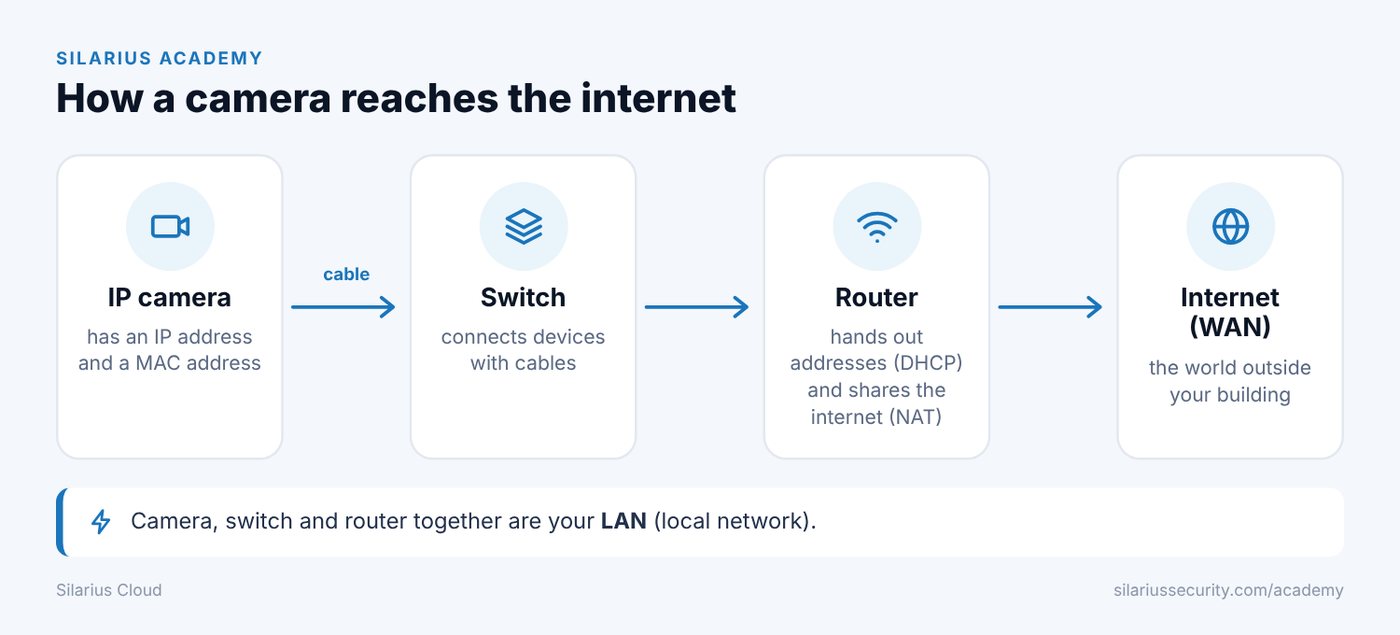
LAN (local network)
The network inside your home or business. It connects your cameras, computers and other devices. A router usually runs it.
WAN (the internet)
The outside internet connection. Your local network connects to it through a modem or router.
Router
The box that connects your local network to the internet. It also hands out IP addresses to your devices.
When a camera asks for a "gateway" in its network settings, that is usually your router's IP address. (This is different from the Silarius Gateway, which is a product.)
Switch
A box with many network ports. It lets your cameras, computers and other devices talk to each other. A PoE switch can also power cameras through the network cable.
DHCP
The system that gives out IP addresses automatically. It is handy during setup. Many installers later switch cameras to static IP addresses (addresses that never change). That makes things more predictable.
DNS
Computers connect using numbers, not names. DNS turns a name you type into the number the computer needs. Think of it as the internet's phone book.
Dynamic DNS (DDNS) keeps a name pointing to your site even when your internet company changes your address.
MAC address
A fixed ID built into each network device. It helps you tell one camera from another on your network.
ONVIF
A common language that lets IP cameras from different makers work with other systems. It is how Silarius Cloud can use your own existing cameras, any model.
NAT
NAT lets many devices share one internet connection. It turns many private addresses into one public address. It also hides your devices from the outside, which adds safety.
Common questions
Can I connect my NVR or DVR to Silarius Cloud?
Yes. Connect the NVR or DVR to the Silarius Gateway, and each camera on it is added on its own. See Connect your NVR or DVR.
Still stuck? We'll do it with you, free.
Silarius customers can get free remote help: sign in, click one button, and a Silarius technician joins your computer.