
Cameras on different networks with one Silarius Gateway
Connect cameras spread across different IP ranges, VLANs or sites through a single Silarius Gateway.
By the end you will know how one Silarius Gateway can reach cameras on many different networks. You will also know what details to send Silarius support.
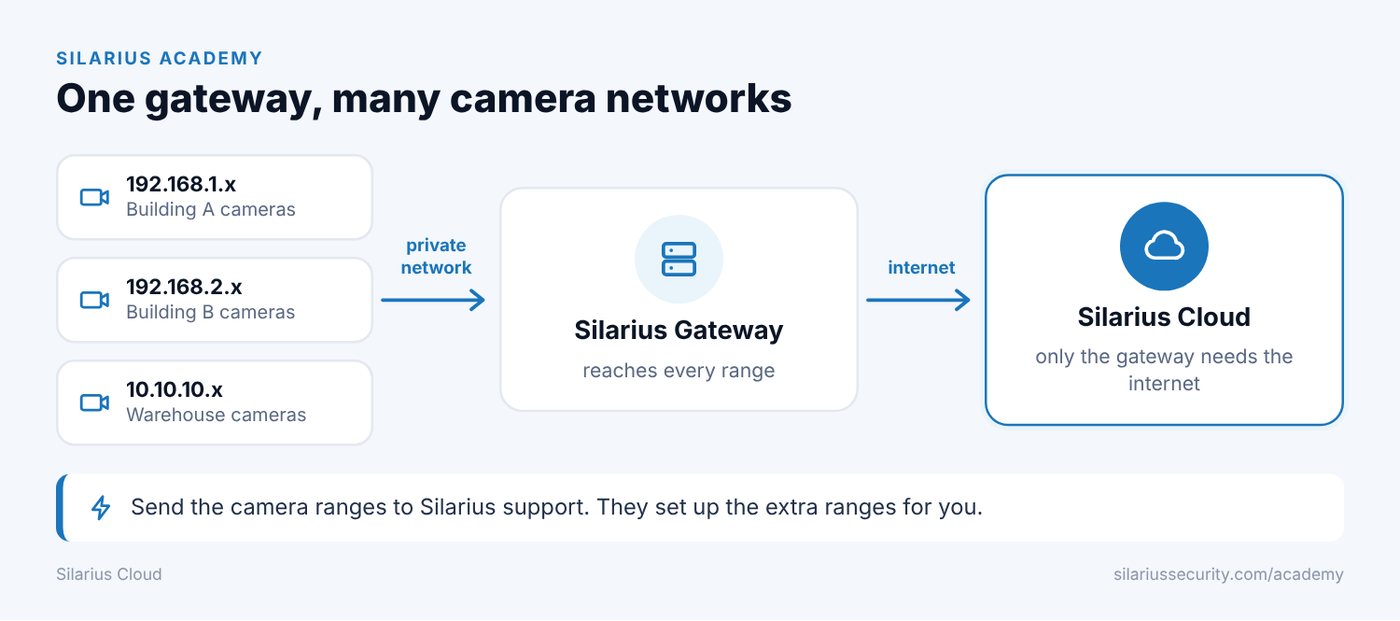
One gateway, many networks
Big sites often split cameras into different network groups. Each group has its own IP range, called a subnet. For example: 192.168.1.x, 192.168.2.x, 192.168.3.x and 10.10.10.x.
One Silarius Gateway can find and connect cameras in all of them, as long as it can reach them.
Reach is what matters
The gateway and the cameras do not need to be on the same subnet. A camera can be connected if:
- There is a working path (route) from the gateway to the camera.
- The needed ports are open.
- Firewall rules allow the traffic.
Cameras can be on different subnets, behind VLANs (separate virtual networks), at other sites, or linked by private lines or VPNs.
Cameras don't need the internet
Only the gateway needs to reach the cloud. Cameras can stay off the internet, as long as the gateway can reach them over your private network.
Example: Site A, Site B and Site C each link to the gateway over a private network. The gateway then sends their video to Silarius Cloud.
Silarius sets up the extra ranges
You don't add extra network ranges yourself in the normal gateway screens. Send these details to Silarius support, and they will set up the gateway:
- Camera IP ranges and subnets
- The gateway's network details
- Routing details
- VLAN or VPN details
- Firewall rules
- Ports and protocols in use
To send them, contact Silarius support: get free remote setup help or email us.
Still stuck? We'll do it with you, free.
Silarius customers can get free remote help: sign in, click one button, and a Silarius technician joins your computer.