
How smart AI detection works
Learn how Silarius Cloud looks at your video and tells people, cars and other things apart.
By the end you will know how smart AI detection works, what it can spot, and why your camera's own settings matter so much.
What is smart AI detection?
Smart AI detection (also called object detection or smart analytics) is a computer brain in Silarius Cloud. It watches your video and names what it sees, like a person or a car.
The work happens in the cloud (big computers on the internet). You don't need any special box at your site for it.
It starts with your camera
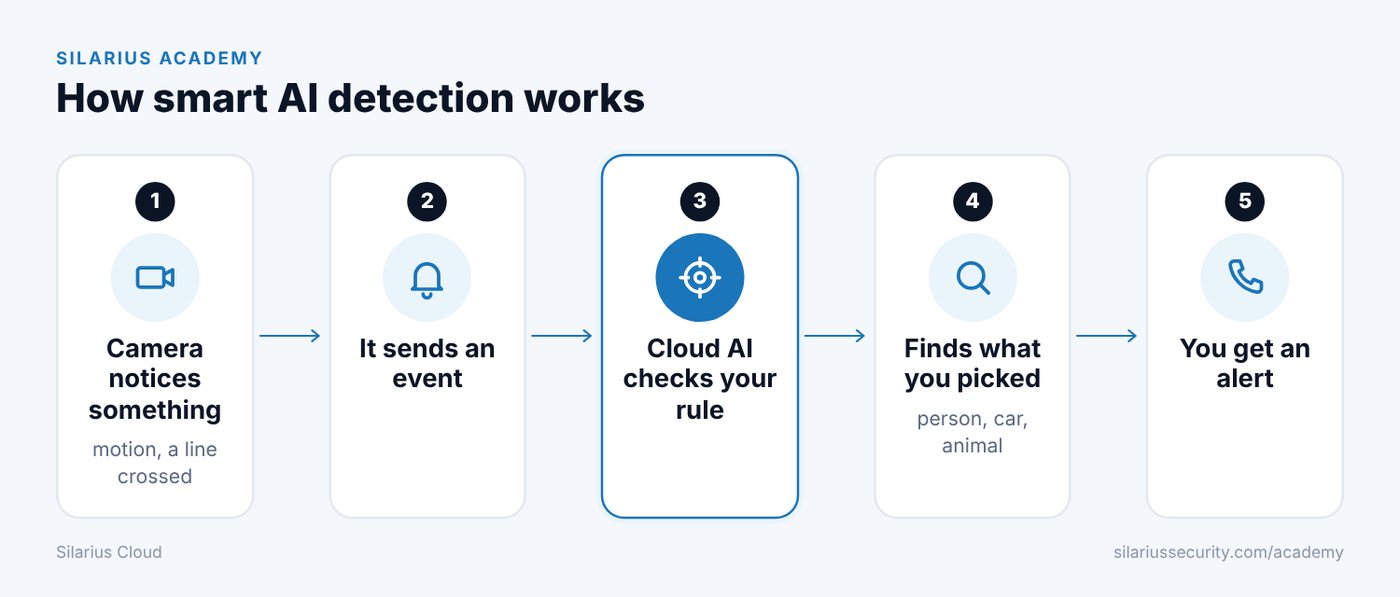
The cloud does not watch every second of video. It waits for your camera to say "something happened." That message is called an event.
Camera events can be:
- Motion (something moved in the picture)
- Line crossing (something crossed a line you drew)
- Intrusion (something entered an area you drew)
- Other alarms your camera can send
No camera event means no AI check. This is why the camera's motion settings matter so much.
What happens next
When an event comes in, Silarius Cloud checks your detection rules for that camera. A rule says which camera event starts the check and which things to look for.
If the event matches a rule, the cloud looks at the video picture by picture for as long as the event lasts. It searches for the things you picked, like a person or a car.
Each thing it finds gets its own tracking number. The cloud follows it until it leaves the picture. It reports each new thing only once, so you don't get the same person over and over.
What it can find
Every plan with smart AI detection can find these three things right away:
- Person
- Car
- Animal
More types can be turned on by request. They include luggage, bicycle, boat, hat, hard hat, no hard hat, vest, no vest, license plate, fire, smoke, person loitering (someone hanging around too long), more detailed car types and gun.
What you can get depends on your area and your service. To ask about extra types, contact Silarius: request a quote or email us.
Basic and Advanced detection
There are two levels of smart AI detection.
Basic tells you what kind of thing it found, where it was, how big it was and its colors. It checks only the first 10 seconds of an event, plus 2 seconds before it. If a person walks in later than that, Basic can miss them. So Basic is not a good fit for cameras that send lots of false events.
Advanced checks the whole event, start to finish. It also gives you extra numbers, like people counting and heatmaps (color maps of where people spend time).
Both levels work with Silarius X cameras (plug and play) and with cameras added by ONVIF. ONVIF is a common language that lets cameras from many makers talk to Silarius Cloud. Neither level works with cameras added with the Generic option.
Limits to know
- Each camera can have up to 6 detection rules.
- Each rule can have up to 10 masks (areas you draw where the AI should look).
- Masks can overlap or sit inside each other.
- Good picture quality makes a big difference. A clear, sharp, well-lit picture gives better results.
Can I use the AI inside my camera?
Maybe. If your camera's own smart features follow the ONVIF standard, you can control them through Silarius Cloud. See Use events from your camera's own AI.
Good to know
- Smart AI detection is an add-on. To turn it on for a camera, contact Silarius: request a quote or email us.
- Have an NVR or DVR? Its cameras can connect through the Silarius Gateway too. See Connect your NVR or DVR.
Common questions
Does the AI watch my video all the time?
No. It starts checking when your camera sends an event, like motion. Then it checks the video for the length of that event.
Will I get ten alerts if one person walks around for a minute?
No. Each person or thing gets a tracking number. It is reported once while it stays in view.
Do I need to buy a special box for the AI?
No. The AI runs in the cloud.
Still stuck? We'll do it with you, free.
Silarius customers can get free remote help: sign in, click one button, and a Silarius technician joins your computer.