
Why the speed sometimes jumps above your setting
Understand why a camera set to 1 Mbps sometimes shows 2 Mbps or more, and when to worry.
By the end you will know why short speed jumps are normal. You will also know when a jump is a real problem.
What you might see
You set a camera to 1 Mbps in Silarius Cloud Admin. But in the web app it sometimes shows something like 2,522 Kbps. A moment later it might show only 13 Kbps.
This is usually fine. Your settings are probably right.
Full pictures and change pictures
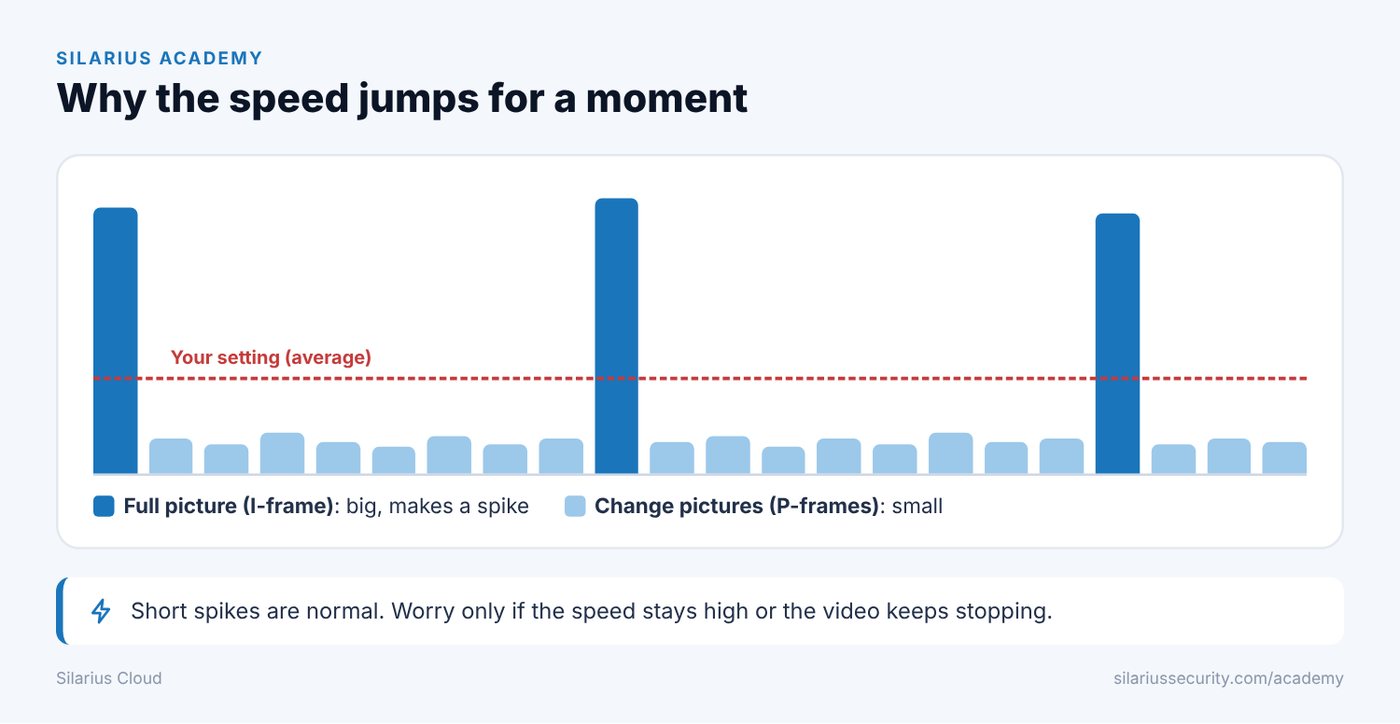
Cameras send two kinds of frames (single pictures in the video):
- I-frame: a full picture. It is big, so the speed jumps up for a moment.
- P-frame: only what changed since the last picture. It is small, especially when nothing is moving.
So the speed goes up when a full picture is sent. Then it drops back down.
Why the jump can be big
Think of the speed limit as a budget over a few seconds.
Say a full picture is sent every 2 seconds, and the limit is 1 Mbps. The camera can spend about 2 Mbit over those 2 seconds. If the small pictures use 100 Kbit, about 1.9 Mbit is left for the full picture. That full picture shows up as a spike.
The longer the gap between full pictures, the bigger each spike can be.
Why two cameras look different
- Movement: more movement makes bigger change pictures. That leaves less room for the next full picture.
- The camera itself: some cameras pack video better than others.
When to worry
Short spikes are normal with H.264 and H.265 video. Look again a moment later. If the number drops back down, all is well.
If the speed stays high all the time, or the video looks bad or keeps stopping, then look deeper. Contact Silarius support: get free remote setup help or email us.
Still stuck? We'll do it with you, free.
Silarius customers can get free remote help: sign in, click one button, and a Silarius technician joins your computer.