
Turn on your camera's ONVIF user
Turn on ONVIF and make an ONVIF user on your camera so Silarius Cloud can talk to it.
By the end your camera will have ONVIF turned on and its own ONVIF user, so Silarius Cloud can control it.
Don't keep the camera's factory default password. Some cameras won't work with Silarius Cloud while it is still set.
Step by step
- Open the camera's own web page
For a Silarius X camera, open its Troubleshooting tab in Silarius Cloud Admin and use the button that makes a link (Generate link). This opens the camera's page from anywhere. For a camera added by ONVIF URL, use the HTTP link and port from its Network tab.
- Find the ONVIF settings
Every camera is a little different. ONVIF is often under a Security or Network Security menu. On some cameras it is under Network, then Advanced Settings, then Integration Protocol. On others it is under System, then ONVIF.
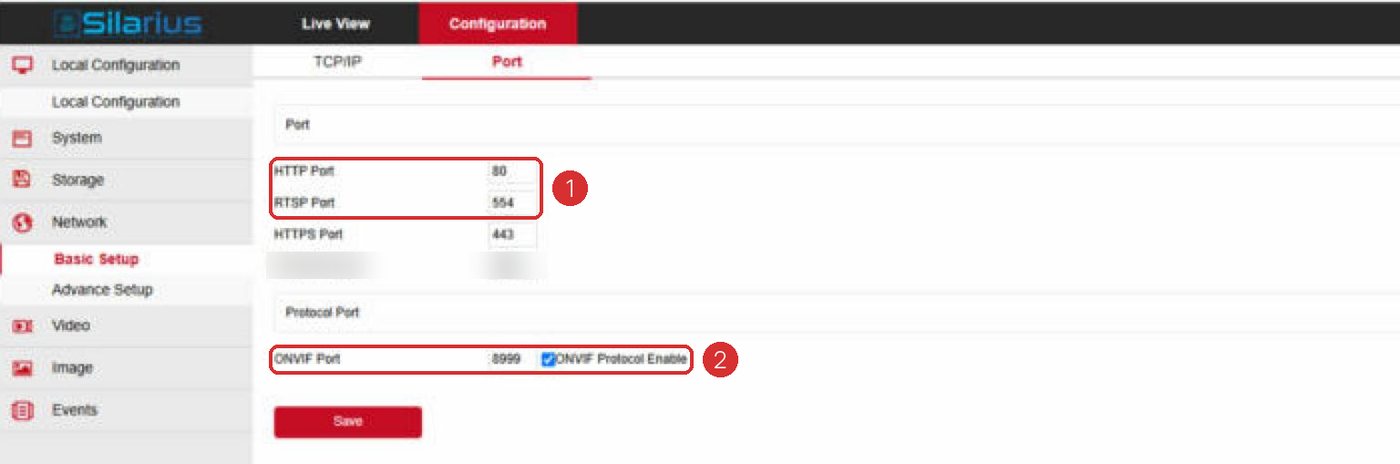
- Turn ONVIF on
If you see a box like Enable ONVIF, check it.
- Add an ONVIF user
Click Add to make a new user. Using the same username and password as the camera's web page is fine. Set the user level to Administrator.
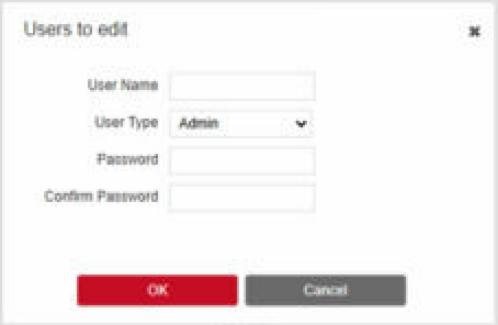
- Pick the sign-in check type
Some cameras ask for an authentication mode. Some need digest. Others need digest/WSSE. If the camera won't connect, try the other one.
- Save
Click Save. Then use this ONVIF username and password in Silarius Cloud.
Why some cameras need this
Some cameras keep ONVIF turned off until you switch it on. Some also need a separate ONVIF user (a sign-in just for ONVIF).
If ONVIF is off, the camera's Troubleshooting tab in Silarius Cloud Admin shows an error. This happens even when the username and password are right.
Common questions
I can't find the ONVIF menu.
Check the camera's own manual, or contact Silarius support: get free remote setup help or email us.
I changed the ONVIF password. What now?
Update it in Silarius Cloud too. See Change a camera's ONVIF sign-in.
Still stuck? We'll do it with you, free.
Silarius customers can get free remote help: sign in, click one button, and a Silarius technician joins your computer.