
Your profile, password and username
Change your name, email, password, username and screen settings.
By the end you will be able to change your own name, email, password and username, and set up the web app the way you like it.
Step by step
- Change your name or email
On the User Info tab, change your first name, last name or email. Click Save. Silarius Cloud emails go to this address.

- Change your password
On the Password tab, type your current password, then your new one. Save.
- Set your own username
On the Username tab, uncheck Use email as username. Type the username you want and click Save.
- Sign in with the new username
From now on, sign in with your new username. Your email no longer works as a username. Your password stays the same.
In the web app
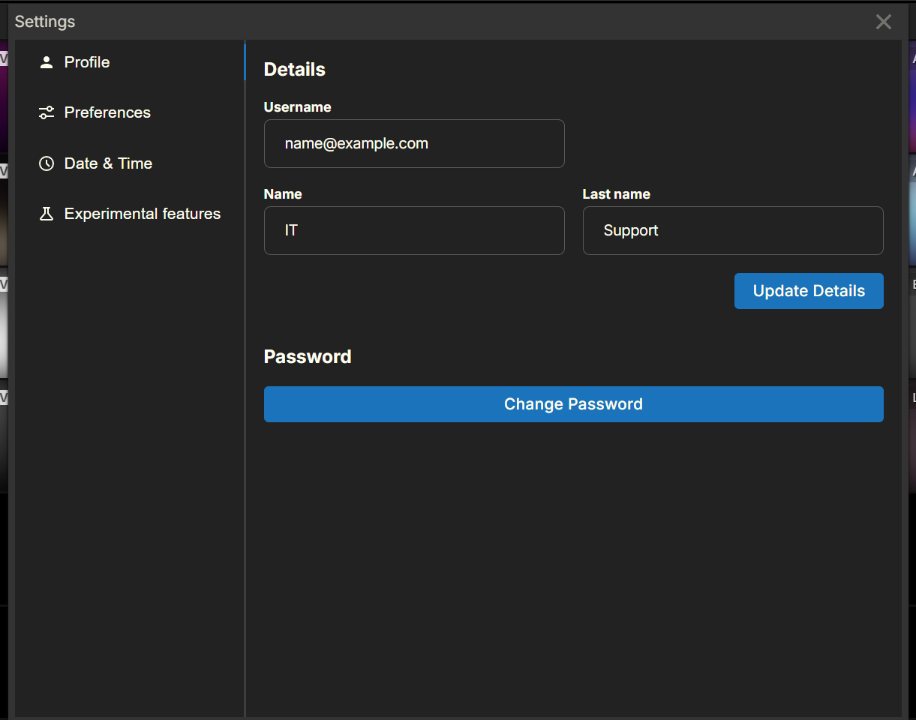
Click the user account icon, then click your username. Your profile window opens. Changes here only affect you, not other people.
- Profile tab: change your first and last name, then click Update details. Change your password, then click Change Password. Your username shows here, but you can't change it here.
- Preferences tab: pick the default picture shape (aspect ratio) for your cameras. You can also pick a different shape for certain cameras.
- Experimental features tab: move the menu bar to the top, bottom or left. You can also turn on fisheye dewarping, which flattens the round picture from a 360-degree camera.
In Silarius Cloud Admin
Click the menu next to your account name (or the settings icon next to it), then click Profile.
Good to know
- To go back to signing in with your email, check Use email as username again.
- Your name and email here are different from the account's contact details in Account Profile.
Common questions
I forgot my password. What do I do?
On the sign-in screen, click Forgot your password? You will get an email with a reset link.
How do I add a second step to my sign-in?
Still stuck? We'll do it with you, free.
Silarius customers can get free remote help: sign in, click one button, and a Silarius technician joins your computer.