
Open your camera's own page from Silarius Cloud Admin
Reach a camera's own settings page from anywhere, with a safe link that lasts 60 minutes.
By the end you will open your camera's own web page from anywhere, even when you are not at the site. Every camera has its own settings page. It lets you change things Silarius Cloud cannot change, like motion zones or the camera's clock. You will get a safe link that works for 60 minutes.
What you need
- You are an owner or admin in Silarius Cloud Admin
- A camera added with a registration code (Silarius X cameras and cameras on the Silarius Gateway)
Step by step
- Open the camera's settings
Go to silariussecurity.com/login and sign in to Silarius Cloud Admin. Click Cameras. Click the camera you want.
- Go to the Troubleshooting tab
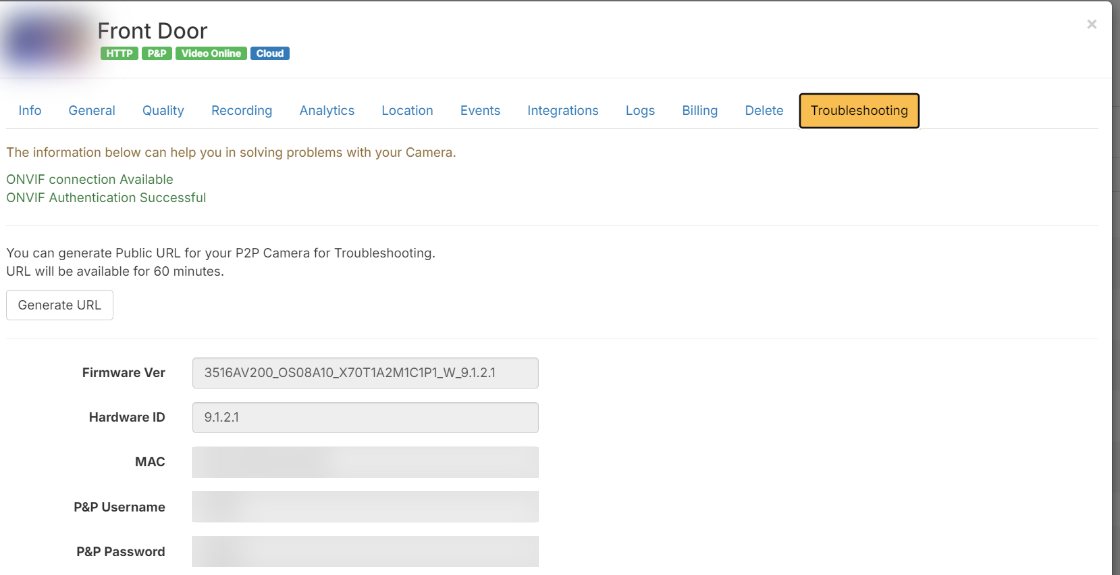
Click the yellow Troubleshooting tab.
- Make the link
Click Generate URL. A web link is made. It works for 60 minutes. After that, click Generate URL again for a new one.
- Open the link
Click Open to open the camera's page in a new tab. Or click Copy and paste the link into your web browser.
- Sign in to the camera
Sign in with the camera's user name and password. The ones Silarius Cloud uses are listed on the same Troubleshooting tab.
The sign-in does not work
Some cameras have one user for ONVIF and a different user for their web page. Then the sign-in saved in Silarius Cloud Admin will not open the web page. Use the camera's web page user instead. Not sure what it is? Contact Silarius support: get free remote setup help or email us.
No live video on the camera's page
The camera's page may not show live video through this link. That is normal for many cameras. To see how your changes look, keep the Silarius Cloud web app open in another tab and watch the camera there.
Good to know
- Nothing is opened on your router. The link goes through Silarius Cloud and stops working after 60 minutes.
Still stuck? We'll do it with you, free.
Silarius customers can get free remote help: sign in, click one button, and a Silarius technician joins your computer.